

Github
GitHub is a cloud-based Git repository hosting service that allows developers to store, manage, and track changes to their code.
GitHub is a cloud-based Git repository hosting service that allows developers to store, manage, and track changes to their code.

Supports authentication: OAuth 2.0
Set up the agent connector
Section titled “Set up the agent connector”Register your Scalekit environment with the GitHub connector so Scalekit handles the authentication flow and token lifecycle for you. The connection name you create will be used to identify and invoke the connection programmatically. You’ll need your app credentials from GitHub’s Developer Settings.
-
Set up auth redirects
-
In Scalekit dashboard, go to Agent Auth → Create Connection.
-
Find GitHub from the list of providers and click Create.
-
Click Use your own credentials and copy the redirect URI. It looks like
https://<SCALEKIT_ENVIRONMENT_URL>/sso/v1/oauth/<CONNECTION_ID>/callback.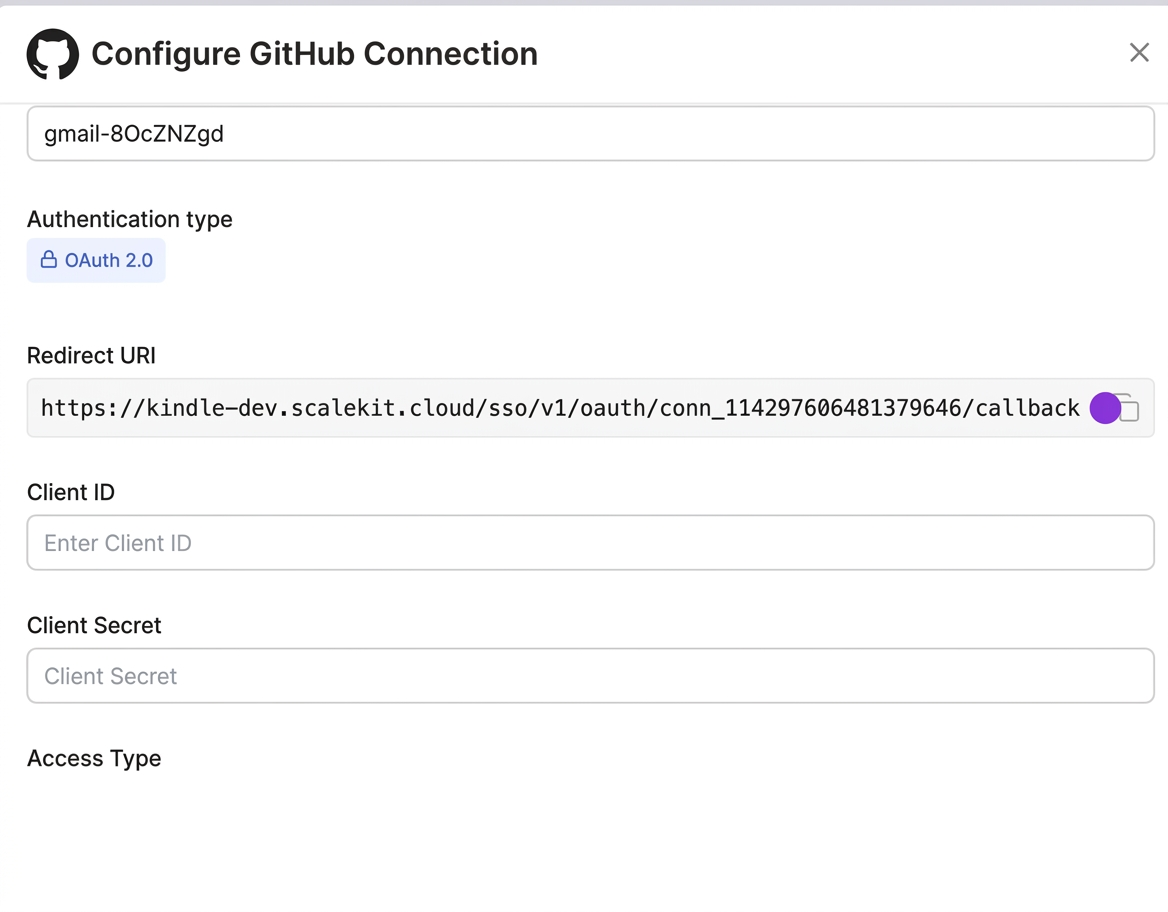
-
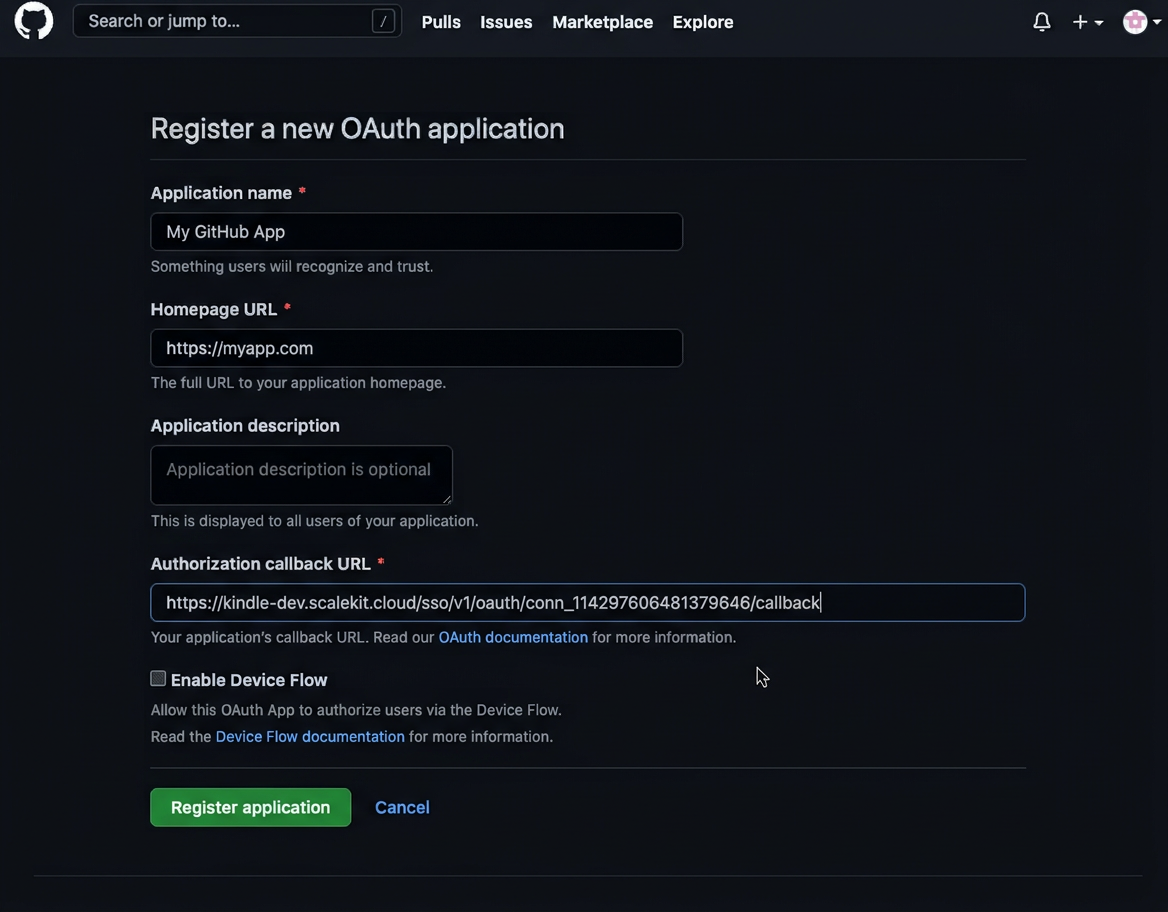
Go to GitHub Developer Settings and open your OAuth app.
-
Under General, paste the copied URI into the Authorization callback URL field and save.
-
-
Get client credentials
In GitHub Developer Settings, open your OAuth app:
- Client ID — listed on the app’s main settings page
- Client Secret — click Generate a new client secret if you don’t have one
-
Add credentials in Scalekit
-
In Scalekit dashboard, go to Agent Auth → Connections and open the connection you created.
-
Enter your credentials:
- Client ID (from your GitHub OAuth app)
- Client Secret (from your GitHub OAuth app)
-
Click Save.
-
Tool list
Section titled “Tool list”github_file_contents_get
Section titled “github_file_contents_get”Get the contents of a file or directory from a GitHub repository. Returns Base64 encoded content for files.
| Name | Type | Required | Description |
|---|---|---|---|
owner | string | Yes | The account owner of the repository |
path | string | Yes | The content path (file or directory path in the repository) |
ref | string | No | The name of the commit/branch/tag |
repo | string | Yes | The name of the repository |
github_file_create_update
Section titled “github_file_create_update”Create a new file or update an existing file in a GitHub repository. Content must be Base64 encoded. Requires SHA when updating existing files.
| Name | Type | Required | Description |
|---|---|---|---|
author | object | No | Author information object with name and email |
branch | string | No | The branch name |
committer | object | No | Committer information object with name and email |
content | string | Yes | The new file content (Base64 encoded) |
message | string | Yes | The commit message for this change |
owner | string | Yes | The account owner of the repository |
path | string | Yes | The file path in the repository |
repo | string | Yes | The name of the repository |
sha | string | No | The blob SHA of the file being replaced (required when updating existing files) |
github_issue_create
Section titled “github_issue_create”Create a new issue in a repository. Requires push access to set assignees, milestones, and labels.
| Name | Type | Required | Description |
|---|---|---|---|
assignees | array<string> | No | GitHub usernames to assign to the issue |
body | string | No | The contents of the issue |
labels | array<string> | No | Labels to associate with the issue |
milestone | number | No | Milestone number to associate with the issue |
owner | string | Yes | The account owner of the repository |
repo | string | Yes | The name of the repository |
title | string | Yes | The title of the issue |
type | string | No | The name of the issue type |
github_issues_list
Section titled “github_issues_list”List issues in a repository. Both issues and pull requests are returned as issues in the GitHub API.
| Name | Type | Required | Description |
|---|---|---|---|
assignee | string | No | Filter by assigned user |
creator | string | No | Filter by issue creator |
direction | string | No | Sort order |
labels | string | No | Filter by comma-separated list of label names |
milestone | string | No | Filter by milestone number or state |
owner | string | Yes | The account owner of the repository |
page | number | No | Page number of results to fetch |
per_page | number | No | Number of results per page (max 100) |
repo | string | Yes | The name of the repository |
since | string | No | Show issues updated after this timestamp (ISO 8601 format) |
sort | string | No | Property to sort issues by |
state | string | No | Filter by issue state |
github_public_repos_list
Section titled “github_public_repos_list”List public repositories for a specified user. Does not require authentication.
| Name | Type | Required | Description |
|---|---|---|---|
direction | string | No | Sort order |
page | number | No | Page number of results to fetch |
per_page | number | No | Number of results per page (max 100) |
sort | string | No | Property to sort repositories by |
type | string | No | Filter repositories by type |
username | string | Yes | The GitHub username to list repositories for |
github_pull_request_create
Section titled “github_pull_request_create”Create a new pull request in a repository. Requires write access to the head branch.
| Name | Type | Required | Description |
|---|---|---|---|
base | string | Yes | The name of the branch you want the changes pulled into |
body | string | No | The contents of the pull request description |
draft | boolean | No | Indicates whether the pull request is a draft |
head | string | Yes | The name of the branch where your changes are implemented (format: user:branch) |
maintainer_can_modify | boolean | No | Indicates whether maintainers can modify the pull request |
owner | string | Yes | The account owner of the repository |
repo | string | Yes | The name of the repository |
title | string | No | The title of the pull request |
github_pull_requests_list
Section titled “github_pull_requests_list”List pull requests in a repository with optional filtering by state, head, and base branches.
| Name | Type | Required | Description |
|---|---|---|---|
base | string | No | Filter by base branch name |
direction | string | No | Sort order |
head | string | No | Filter by head branch (format: user:ref-name) |
owner | string | Yes | The account owner of the repository |
page | number | No | Page number of results to fetch |
per_page | number | No | Number of results per page (max 100) |
repo | string | Yes | The name of the repository |
sort | string | No | Property to sort pull requests by |
state | string | No | Filter by pull request state |
github_repo_get
Section titled “github_repo_get”Get detailed information about a GitHub repository including metadata, settings, and statistics.
| Name | Type | Required | Description |
|---|---|---|---|
owner | string | Yes | The account owner of the repository (case-insensitive) |
repo | string | Yes | The name of the repository without the .git extension (case-insensitive) |
github_user_repos_list
Section titled “github_user_repos_list”List repositories for the authenticated user. Requires authentication.
| Name | Type | Required | Description |
|---|---|---|---|
direction | string | No | Sort order |
page | number | No | Page number of results to fetch |
per_page | number | No | Number of results per page (max 100) |
sort | string | No | Property to sort repositories by |
type | string | No | Filter repositories by type |